 Script Panel
Script Panel Pro · Adobe Illustrator
A script library you can actually find your way through.
Organize Adobe Illustrator scripts with search, tags, favorites, history and folders. Script Panel Pro is a $29 USD one-time lifetime purchase.
$29 USD listed price · One-time lifetime purchase
Offer checked 12 October 2026. See the listing for current acquisition availability.
Currently restricted in the EU; see availability details below.
What it does
Script Panel Pro, explained.
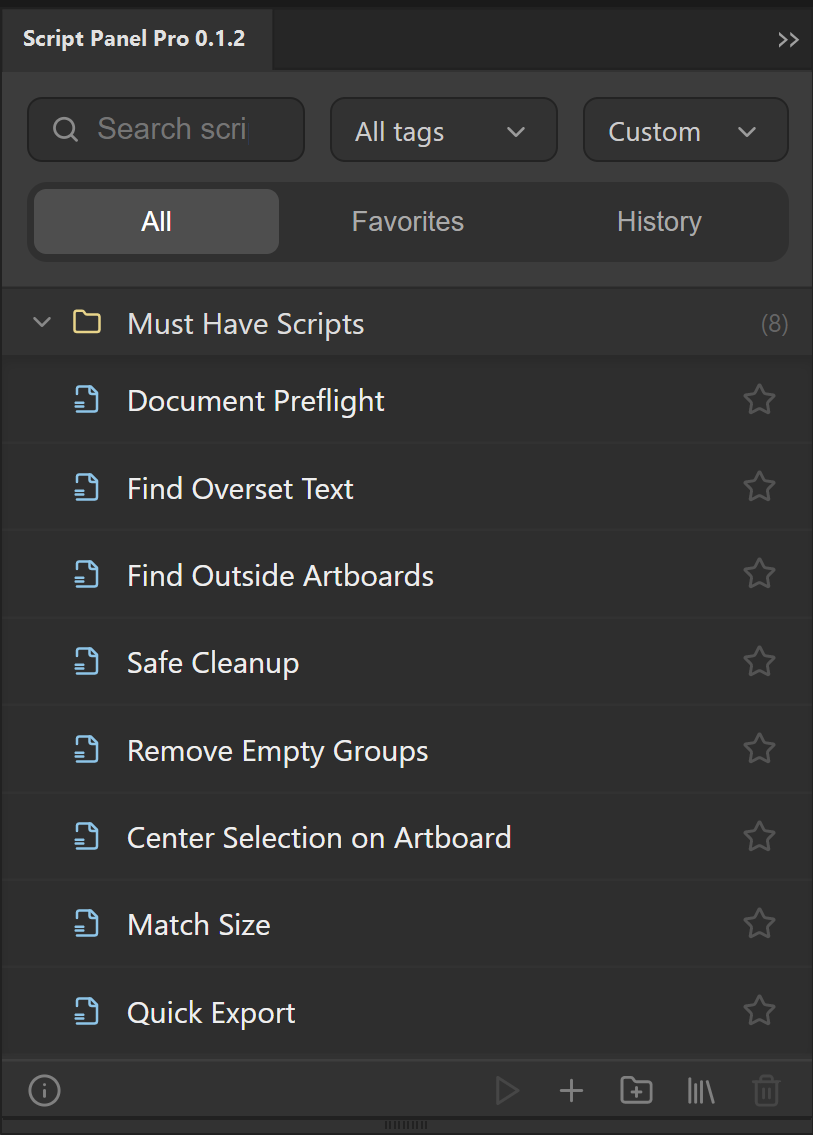
Script Panel Pro is a dockable Adobe Illustrator script manager. It combines local script execution with search, tags, favorites, run history, folders and sorting. The public offer is $29 USD for a one-time lifetime purchase, with no subscription.
Who it is for
Designers and production artists with a growing local script collection who need retrieval and organization as well as execution.
The useful part of the workflow.
Find a tool
Search by script name or tag instead of repeatedly navigating disk folders.
Keep a useful order
Use folders, tags, favorites and sorting to group scripts around the work you do.
Return to recent work
Run history helps you locate scripts used recently; favorites keep repeat tools close.
Run with context
Launch local .jsx, .jsxbin and .js files and read running, success or error feedback. Pro also includes the starting script packs. Confirm the acquired build for its exact included set.
From installation to a first useful run.
- Choose Pro through the website pricing section or the matching Adobe Exchange listing.
- Complete installation and open Script Panel Pro under Window > Extensions in Adobe Illustrator.
- Use Setup Library to choose a local script folder. Add scripts from the panel or drag supported files into it.
- Apply task-based tags, favorite frequently used tools and use search to find a script before running it.
Know the limits
Pro organizes and launches scripts; it does not make every third-party script compatible or harmless. Script Panel batch-run functionality is planned, not currently available. Production Batch Runner is a separate product for export queues, not an included Pro feature.
Checked 12 October 2026: Adobe Exchange displays “not currently available in the EU” for this listing. Acquisition depends on region and Adobe’s current listing status; check the listing before purchase.
Free or Pro?
| Task | Free | Pro |
|---|---|---|
| Local script execution and starting scripts | 8 included scripts | Included; confirm acquired build |
| Search, tags, favorites and history | Unavailable | Included |
| Folders, sorting and advanced library controls | Unavailable | Included |
| Current public price | Free | $29 USD once |
Questions before you install.
Is Pro a subscription?
No. The $29 USD offer is a one-time lifetime purchase. Future Script Panel Pro updates are included at no additional cost.
Should I choose Free or Pro?
Choose Free for local execution and the included starting scripts. Choose Pro when search, tags, favorites, history, folders and library controls solve a recurring retrieval problem.
Can Pro batch-export my artboards?
Script Panel Pro is a script manager. For the dedicated Artboards/Data Sets export queue, see Production Batch Runner. Do not confuse the two products.
Put it to work.
Build a useful Illustrator script library with task-based folders, tags, favorites and a small verified set. Separate source files from panel metadata.
Run a local JSX script using Adobe Illustrator’s Scripts menu or Script Panel. Check document requirements, file location and errors before running again.
Acquire the correct Adobe Exchange panel, complete Creative Cloud installation and open it in Illustrator. Troubleshoot missing panels without changing security settings.