 Script Panel
Start with the task, not the file extension
A JSX file is a script, not an Illustrator artwork file. Read what it changes before execution: some scripts select objects, others modify artwork or create files. Use a trusted source and a saved copy of important artwork. A compiled .jsxbin file may not expose readable source; a filename alone does not establish what it does.
Match the script to Adobe Illustrator. A script written for another Adobe application can use a different object model even if its extension looks familiar.
Run one local script with the native menu
- Open Adobe Illustrator and the document required by the script.
- Save your work and make the required selection. Check whether the script expects an active artboard, text frame or specific object type.
- Choose File > Scripts > Other Script and select the script file.
- Read any options or confirmation supplied by the script.
- Inspect the changed artwork or exported file. No dialog is not proof of success.
Adobe also documents installation in its Scripts folder for menu access. Follow its instructions for your installed version rather than copying a hard-coded Windows or macOS path from an old tutorial.
Use a panel for recurring tools
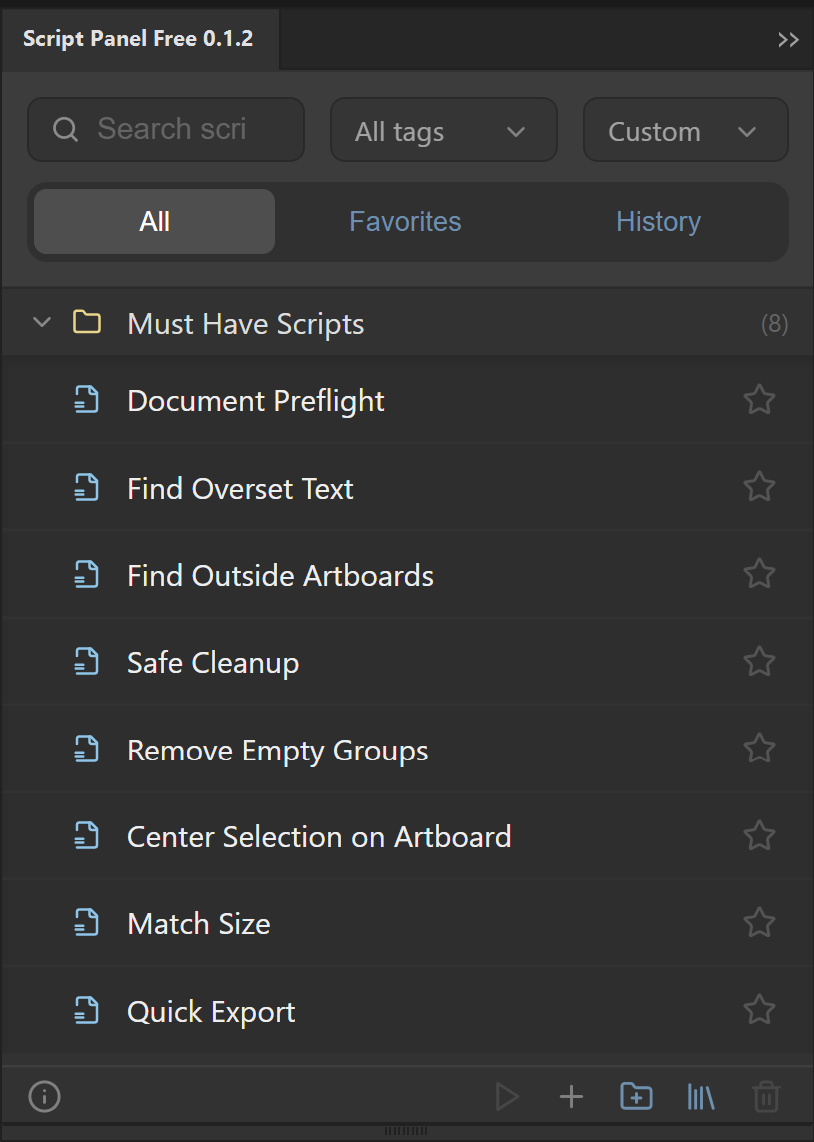
Script Panel Free provides a compact local launcher and eight included starting scripts. Open it from Window > Extensions, choose a suitable script and run it against the required document state. If you need search, task tags, favorites and history for a larger collection, those are Script Panel Pro features.
The included Document Preflight is a useful inspection example. Cleanup and arrangement scripts have different purposes: review their settings and the resulting document. A launcher does not remove a script’s own prerequisites.
When a script does not run
- Missing file: confirm the saved path still exists. Moving or renaming a file can break a library entry.
- Wrong document state: check the active document, selected objects and artboard.
- Host mismatch: confirm the script is written for your Adobe application and supported version.
- Repeated failure: record the error text and script name. Compare the native menu result with the panel result before blaming the launcher.
Do not repeatedly run a partially completed operation without checking what it already changed. A saved copy makes recovery easier.
The panel for this task
Run local Adobe Illustrator scripts from a dockable panel. Script Panel Free includes 8 Must-Have Scripts, with no account or subscription.
Explore Script Panel FreeSources and scope
This guide combines the publisher’s product source and documented workflow with the official references below where applicable. Interface screenshots show setup, not a newly verified host result. Inspect your actual output before production delivery.