 Script Panel
Choose the exact product and edition
Script Panel Free, Script Panel Pro and Production Batch Runner are three separate Adobe Exchange listings from the Script Panel publisher. Free is the starting script launcher, Pro adds library organization, and Batch Runner is the dedicated export queue. Buying Pro does not mean Batch Runner is included.
Check the product name, publisher, supported host and platform before acquisition. Similar generic script-panel names from other publishers can lead to a different product.
Install through Adobe Exchange
- Open the matching listing linked from the product page.
- Check current availability and the displayed price. Complete acquisition through Adobe’s supported process.
- Allow Creative Cloud to finish installation before opening the host panel.
- Save your work, restart Adobe Illustrator and open Window > Extensions.
- Open the exact product entry. Batch Runner’s published 0.1.1 menu includes the beta label.
A panel directory existing on disk is not proof that installation or host loading succeeded. Confirm the panel actually opens and displays the expected product identity.
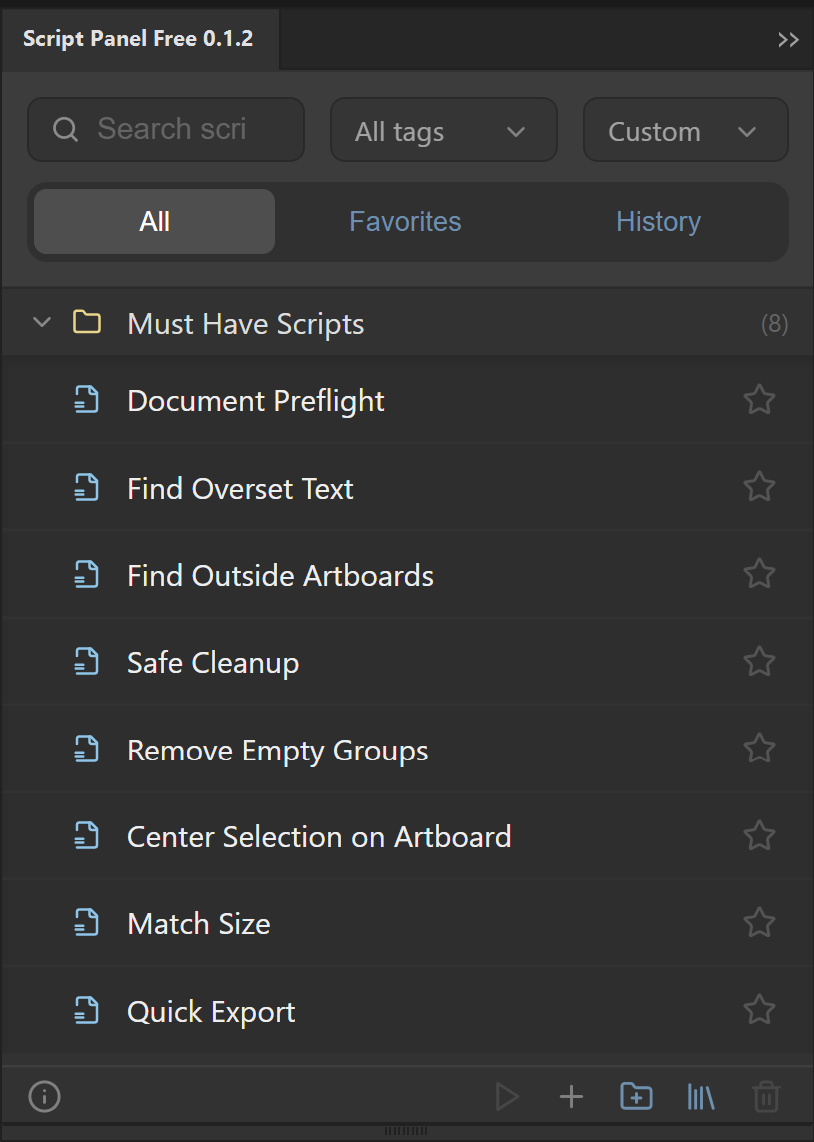
Complete the first useful task
For Script Panel Pro, use Setup Library to choose the local script folder and add supported files. For Free, start with an included script suited to your document state. For Batch Runner, save a .ai source document, choose Artboards or Data Sets, set an output folder and preset, then review the filename preview before a small test run.
Installation and successful operation are separate checks. Inspect the result of the first task before depending on the panel for a production deadline.
If the panel is missing
- Confirm the exact listing was acquired using the intended Adobe account.
- Check that Creative Cloud finished the installation and that you restarted Adobe Illustrator.
- Read the listing’s current compatible-host and platform details. Adobe currently warns that plugins/extensions are not supported on new Windows ARM devices.
- If installation reports an error, use Adobe’s plugin-installation troubleshooting rather than disabling host security settings.
- Contact product support with the panel name, version, operating system, Adobe Illustrator version and exact error. Do not send private artwork by default.
Regional availability
On 12 October 2026, all three public Adobe Exchange listings displayed an EU availability restriction. A visible price or published page does not guarantee that every region can acquire it. The current listing is the acquisition authority. Website pages should describe this restriction, not suggest that the panel is available everywhere.
The panel for this task
Run local Adobe Illustrator scripts from a dockable panel. Script Panel Free includes 8 Must-Have Scripts, with no account or subscription.
Explore Script Panel FreeSources and scope
This guide combines the publisher’s product source and documented workflow with the official references below where applicable. Interface screenshots show setup, not a newly verified host result. Inspect your actual output before production delivery.