 Script Panel
Build a small verified core
Start with tools you can explain and have used on a test document. For each script, record its purpose, source, version where available, supported host and expected document state. Keep unused downloads outside the active library until you understand them. A large collection is less useful if you cannot tell which version you should run.
The included Must-Have Scripts use four task groups: Inspect, Clean, Arrange and Export. Those labels are a useful starting vocabulary, not a requirement to put every third-party script into the same structure.
Give names a job
Prefer names such as “Select outside artboards” to “Utility_final_2”. A recognizable action plus an object makes retrieval easier. Avoid renaming externally maintained files without recording the original identity; updates may otherwise look like unrelated tools.
Keep separate variants only when their behavior differs. A duplicate copy in several folders creates uncertainty about updates. A tag can describe a second use case without creating another script file.
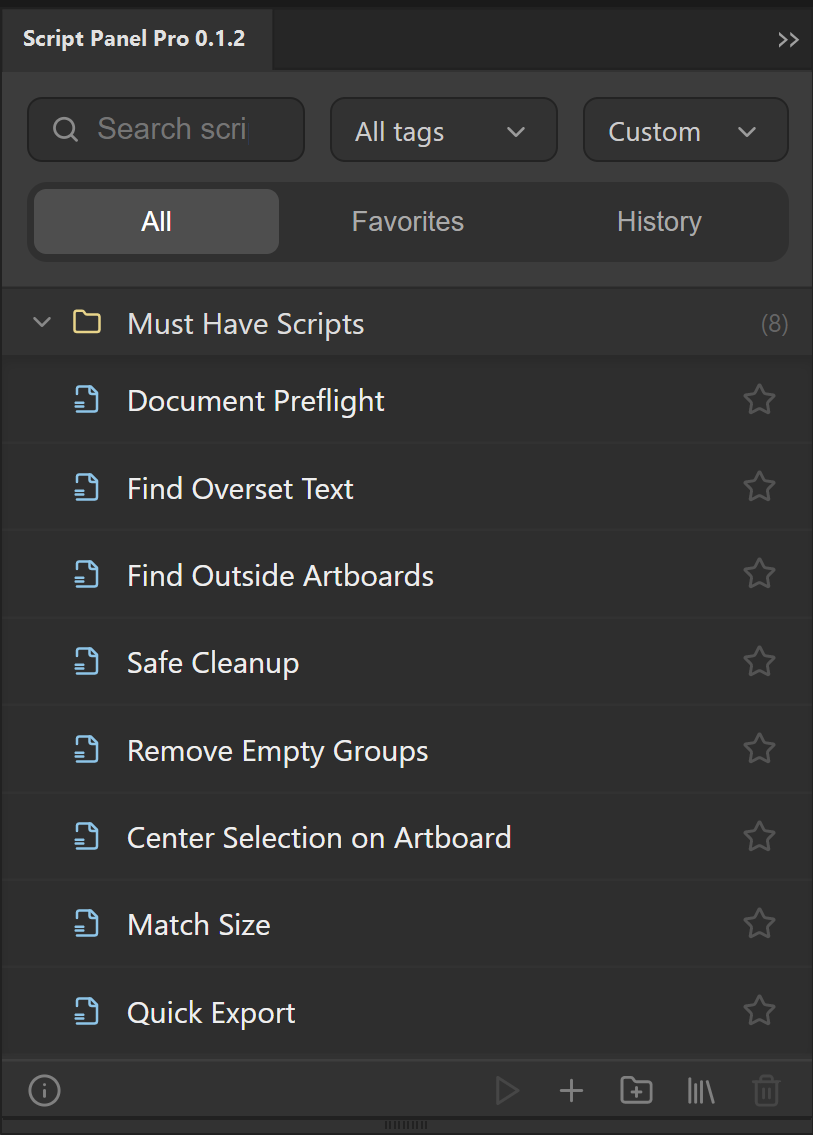
Organize in Script Panel Pro
- Choose your local script folder with Setup Library and add the supported files.
- Group entries with folders around recurring tasks.
- Add a small set of task tags, such as export, preflight or text. Use the same spelling each time.
- Favorite scripts you actually use repeatedly.
- Search by name or tag when you know the task; use History when you want to repeat recent work.
- Choose a sort order that supports your workflow instead of continually dragging everything back into place.
These are Pro library-management features. Free is the local-execution starting offer, not a search-enabled library manager.
Maintain the source and its references
Panel organization and disk storage are different layers. A missing-file warning should lead you to check the real path. If you reorganize disk folders, verify the affected entries before the next production session. Keep original source/license information with your scripts and back up the library separately from artwork.
Review favorites periodically: remove tools that are obsolete or unsafe for your current documents. Do not mistake run history for a guarantee that the same script is suitable for today’s selection.
Decide whether Pro solves the actual friction
A handful of scripts can be practical through the native Scripts menu or Free launcher. Pro is useful when finding a known tool, returning to recent work or maintaining task groups is the recurring problem. It does not rewrite scripts or verify every third-party operation for you.
The panel for this task
Organize Adobe Illustrator scripts with search, tags, favorites, history and folders. Script Panel Pro is a $29 USD one-time lifetime purchase.
Explore Script Panel ProSources and scope
This guide combines the publisher’s product source and documented workflow with the official references below where applicable. Interface screenshots show setup, not a newly verified host result. Inspect your actual output before production delivery.