Translate one text box with Rewrite (built in)
- Select a text box that contains text.
- Choose Type > Rewrite, or Rewrite from the Properties panel’s Quick Actions or the right-click menu.
- In the Contextual Task Bar, choose Translate and a target language, then Generate.
- Pick a variation in the Properties panel to replace the text; Reset brings the original back.
Adobe documents these limits: up to 4,096 input characters, only languages available in Illustrator, and the translated text uses the default font for the selected language. Translation does not use generative credits.
When a translation panel is the better fit
Rewrite works on the text box you selected. Packaging, label sets and multi-language posters usually have dozens of frames per artboard, brand names that must not change and a deadline. A panel that runs inside Illustrator can take a whole selection or the active artboard at once and write each translation back into its own frame.
Translate takes selected characters, selected text frames, or the whole active artboard when nothing is selected: up to 20 frames and 6,000 characters per run, 45 target languages. Its glossary keeps brand names and product codes exactly as written and applies your own terms; Restore original brings back the previous text. It needs Adobe Illustrator 27.0 or later and an internet connection, starts with a free trial of 5,000 characters and continues with a subscription from $9 a month.
Other translation panels are listed on Adobe Exchange, for example Translate.photo and Vitra.ai. Compare their current listings for languages, limits and price.
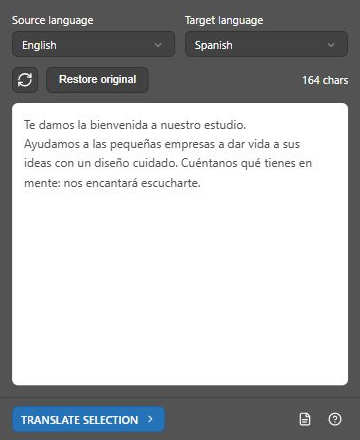
Prepare a label set in several languages
- Finish the source-language artwork and keep live text: outlined text and text inside placed images cannot be translated.
- Duplicate the artboard once per language and name each artboard with its language code.
- Add brand names, product names and legal terms to the glossary before the first run.
- Translate each artboard into its language, then check line breaks and overset text.
- Export each language as its own file with a repeatable name, for example
label_de.pdf.
What to check before print
- Meaning: machine translation can be wrong; have a fluent speaker check customer-facing and legal text.
- Fonts: the target language may need characters your font does not have.
- Length: German and French often run longer than English; check every frame for overset text.
- Right-to-left and complex scripts need a font and paragraph settings that support them.
The panel for this task
Translate selected text, text frames or a whole artboard in place in Adobe Illustrator. 45 languages, a glossary for brand terms and restore original.
Explore TranslateSources and scope
This guide combines the publisher’s product source and documented workflow with the official references below where applicable. Interface screenshots show setup, not a newly verified host result. Inspect your actual output before production delivery.