 Script Panel
Design names for the person receiving the files
A useful file name answers: which job, which unit, and which output? Start with a stable document identifier, add the artboard or data-set name, then identify the preset or purpose. An index is useful when unit names repeat. Separate a human delivery identifier from the extension added by the export format.
For an illustrative document “Spring”, artboard “Front” and preset “Web”, a readable target could be Spring_Front_Web_1.png. This is a naming example, not an exported customer result.
Use the current panel’s naming parts
Production Batch Runner exposes naming parts for document, unit, preset and index. The unit depends on Artboards or Data Sets mode. The underlying supported tokens include {document}, {artboard}, {dataset}, {preset} and {index}. Use the visible naming controls and filename preview as the authority for your installed version.
- Save and identify the source document.
- Select the correct source mode and units.
- Configure active output presets with distinct names and appropriate suffixes/subfolders.
- Keep the naming parts that identify the delivery, remove redundant parts and review several previews.
- Check both the first unit and units with long or repeated names before Run.
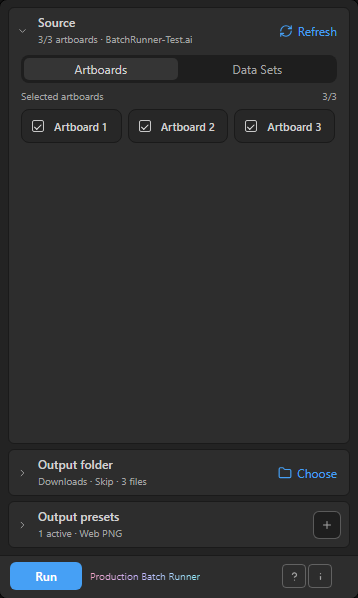
Choose what happens when a file already exists
- Skip
- Keep the existing file and omit that colliding output. Inspect skipped counts so an older file is not mistaken for a fresh export.
- Overwrite
- Replace the matching destination file. Use this only when replacement is intended and the destination is correct.
- Auto-number
- Choose an available numbered name. In the current source, numbering starts at _2 for a collision. Check the resulting files before delivery.
Use a dedicated output directory rather than mixing a new delivery with unrelated artwork. Different presets must still have distinct intended destinations; do not depend on collision handling to organize an ambiguous queue.
Avoid fragile file names
Characters such as slash, backslash, colon and asterisk can be invalid in file names. The current naming implementation sanitizes invalid characters, trailing spaces/dots and reserved Windows device names. Sanitization can make two different inputs look alike, so read the preview after the name is normalized.
Keep names concise enough for the destination’s folder structure. Do not include customer secrets or unnecessary personal information. Verify the exact extension and subfolder as well as the base name.
Verify a repeat run
Export a small sample, then review a second planned run against those existing files with the intended policy. Check whether the queue would skip, replace or create numbered files. A correct first run does not prove that a repeat delivery behaves as intended. Review actual results and keep source, preset settings and destination together in your delivery notes.
The panel for this task
Batch-export selected Adobe Illustrator artboards or data sets to PDF, PNG24, JPEG and SVG with output presets, filename preview and retry. Listed at $19 USD.
Explore Production Batch RunnerSources and scope
This guide combines the publisher’s product source and documented workflow with the official references below where applicable. Interface screenshots show setup, not a newly verified host result. Inspect your actual output before production delivery.